
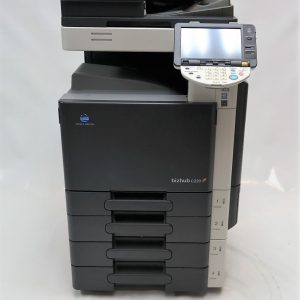
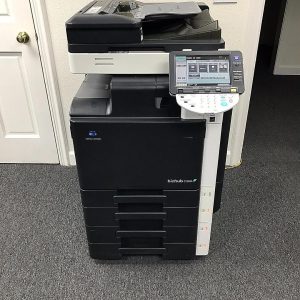
The Konica Minolta Bizhub 287 is a versatile color multifunction printer designed for medium to large-sized businesses.
It offers 28 pages per minute (ppm) printing, copying, and scanning with a 1200 x 1200 dpi resolution, providing high-quality output.
Key features include advanced duplex scanning, secure printing, a 7-inch color touchscreen, and support for mobile printing and cloud integration.
With robust security, energy-efficient operation, and flexible paper handling, the Bizhub 287 is an ideal solution for businesses looking to improve productivity, streamline workflows, and manage high-volume document tasks efficiently.
Description
The Konica Minolta Bizhub C287 is a powerful and efficient color multifunction printer (MFP) designed for businesses that require high-quality printing, copying, scanning, and optional faxing. Built for medium to large-sized offices, the Bizhub C287 offers a wide range of advanced features, robust security, and energy-efficient functionality, making it a highly reliable solution for optimizing document workflows, improving productivity, and enhancing overall office efficiency.
1. Key Features:
- Color Printing: The Bizhub C287 delivers professional color printing with a resolution of 1200 x 1200 dpi, ensuring crisp, vibrant, and high-quality prints for both color and monochrome documents.
- Print Speed: With a print speed of 28 pages per minute (ppm) for both color and black-and-white documents, the Bizhub C287 is well-suited for offices with moderate to high-volume printing needs, providing fast output and increased efficiency.
- Copying: The Bizhub C287 offers a versatile copying function with features such as automatic duplex copying, enlargement/reduction (25% to 400%), and multiple-copy options. These features enhance flexibility for various copy jobs.
- Scanning: The device supports advanced scanning capabilities, including duplex scanning at speeds up to 80 images per minute (ipm). It supports scanning to multiple destinations, such as email, network folders, USB drives, and cloud services, enabling fast, efficient document digitization and distribution.
- Optional Faxing: The Bizhub C287 includes an optional fax kit for businesses that require faxing capabilities, providing an additional communication option alongside digital workflows.
2. Performance & Productivity:
- Processor & Memory: The Bizhub C287 is powered by a 1.46 GHz processor and equipped with 2 GB of RAM, ensuring smooth, efficient performance even for demanding printing and scanning tasks.
- Paper Handling: The Bizhub C287 comes with a standard paper capacity of 1,150 sheets, which can be expanded up to 6,650 sheets with additional paper trays, providing flexible paper handling for high-volume offices. The device supports various paper sizes, including A3, and various paper types, such as plain paper, envelopes, labels, and heavy stock.
- Finishing Options: The Bizhub C287 offers a variety of optional finishing features, such as stapling, hole-punching, booklet making, and folding, enabling businesses to complete document finishing tasks directly at the device, which increases efficiency and reduces reliance on external finishing equipment.
3. User Interface:
- Touchscreen Control Panel: The Bizhub C287 features an intuitive 7-inch color touchscreen that allows users to easily navigate the device’s functions. The touchscreen interface can be customized with shortcuts to frequently used functions for faster access.
- Mobile Printing: The device supports mobile printing solutions such as Apple AirPrint, Google Cloud Print, and Mopria, making it easy to print directly from smartphones, tablets, and other mobile devices without the need for additional drivers.
- Cloud Integration: The Bizhub C287 can be seamlessly integrated with cloud storage services like Google Drive, Dropbox, OneDrive, and Box, enabling users to scan directly to and print from the cloud for greater workflow flexibility.
4. Security Features:
- User Authentication & Access Control: The Bizhub C287 features robust user authentication and role-based access control, allowing businesses to restrict access to sensitive functions and documents. This ensures that only authorized users can access confidential information or execute certain tasks.
- Data Encryption & Protection: The device includes comprehensive data protection features, including SSL encryption, IPsec, data overwrite, and hard disk encryption to ensure secure document transmission, storage, and protection from unauthorized access.
- Secure Printing: With secure print functionality, documents are held in the device’s memory until the user authenticates at the device, preventing sensitive documents from being left unattended in the output tray and ensuring greater confidentiality.
5. Energy Efficiency & Environmental Considerations:
- Energy Star Certified: The Bizhub C287 is Energy Star certified, meaning it meets high energy efficiency standards, helping businesses reduce their environmental impact and lower operating costs.
- Eco-Friendly Features: The device includes features like sleep mode and low power consumption during idle periods, reducing overall energy consumption. Additionally, it uses recyclable materials in its construction to further support sustainability initiatives.
- Low Typical Electricity Consumption (TEC): The Bizhub C287 has a low TEC rating, which means it consumes minimal energy during operation, making it an energy-efficient choice for environmentally-conscious businesses.
6. Connectivity & Integration:
- Network Connectivity: The Bizhub C287 supports Ethernet (wired) as a standard connection and offers an optional Wi-Fi module for wireless connectivity. This ensures easy integration into existing network infrastructures and allows for flexible deployment options.
- USB & SD Card Slots: The device comes with USB 2.0 and SD card slots, enabling users to print directly from or scan to external storage devices for added convenience and workflow flexibility.
- Enterprise Integration: The Bizhub C287 can be integrated into enterprise document management systems or customized workflows through Konica Minolta Dispatcher Phoenix or third-party software solutions, improving document routing, archiving, and retrieval.
7. Maintenance & Support:
- Easy Maintenance: The Bizhub C287 is designed with user-friendly maintenance in mind. Key components such as toner cartridges and imaging units are easily replaceable, minimizing downtime and the need for service calls.
- Remote Diagnostics: Konica Minolta provides remote diagnostics and technical support services to address issues quickly and efficiently. The device features automatic alerts for low toner levels, paper jams, or other maintenance needs, helping businesses stay on top of potential issues.
- Proactive Maintenance: Built-in diagnostic tools notify users of required maintenance tasks, ensuring that the device operates at optimal performance levels and reducing the chances of unplanned downtime.
8. Specifications Summary:
- Print Speed: 28 ppm (color and monochrome)
- Max Print Resolution: 1200 x 1200 dpi (via smoothing)
- Standard Paper Capacity: 1,150 sheets (expandable to 6,650 sheets)
- Duplex Printing: Standard
- Scanning Speed: Up to 80 ipm (color and monochrome)
- Max Paper Size: A3
- Connectivity: Ethernet, optional Wi-Fi, USB 2.0, SD card slot
- Dimensions (WxDxH): 23.6 x 23.2 x 28.7 inches (600 x 590 x 730 mm)
- Weight: 55 kg (121 lbs)
9. Conclusion:
The Konica Minolta Bizhub C287 is a versatile and efficient color multifunction printer that delivers high-quality print, copy, and scan functions for medium to large-sized businesses. With its fast 28 ppm print speed, advanced security features, robust paper handling options, and eco-friendly design, the Bizhub C287 is ideal for businesses that require a reliable, secure, and cost-effective solution for managing their document workflows. The device’s mobile printing support, cloud integration, and user-friendly interface further enhance its appeal, providing businesses with the flexibility and productivity they need to stay competitive in today’s fast-paced work environments.



Reviews
There are no reviews yet.